Eloqua Blog · Integration
Building the Romify to Oracle Eloqua Integration, When the Docs Run Out
A practical account of the live architecture, the Eloqua objects behind it, and the field-level work needed when the vendor documentation stops short of the payload detail.
📅 First published: 4 Aug 2026
⏱ Complexity: Advanced • 👥 Audience: Marketing Ops, Martech and Eloqua teams • 🎯 Focus: Webhooks, External Forms, CDOs and consent handling
This is the live integration
An enterprise client needed every badge scan at a trade show or in-person event to land automatically in Oracle Eloqua as a contact record, with campaign attribution, full qualification data, and GDPR consent handling, all without any manual work from the event team.
This is that integration. It is live, it is in use, and the shape of it is deliberately simple: Romify posts the lead capture data directly into an Eloqua External Form, and Eloqua handles the contact update, event history, campaign membership, sales alert and consent routing.
The architecture is one direct path
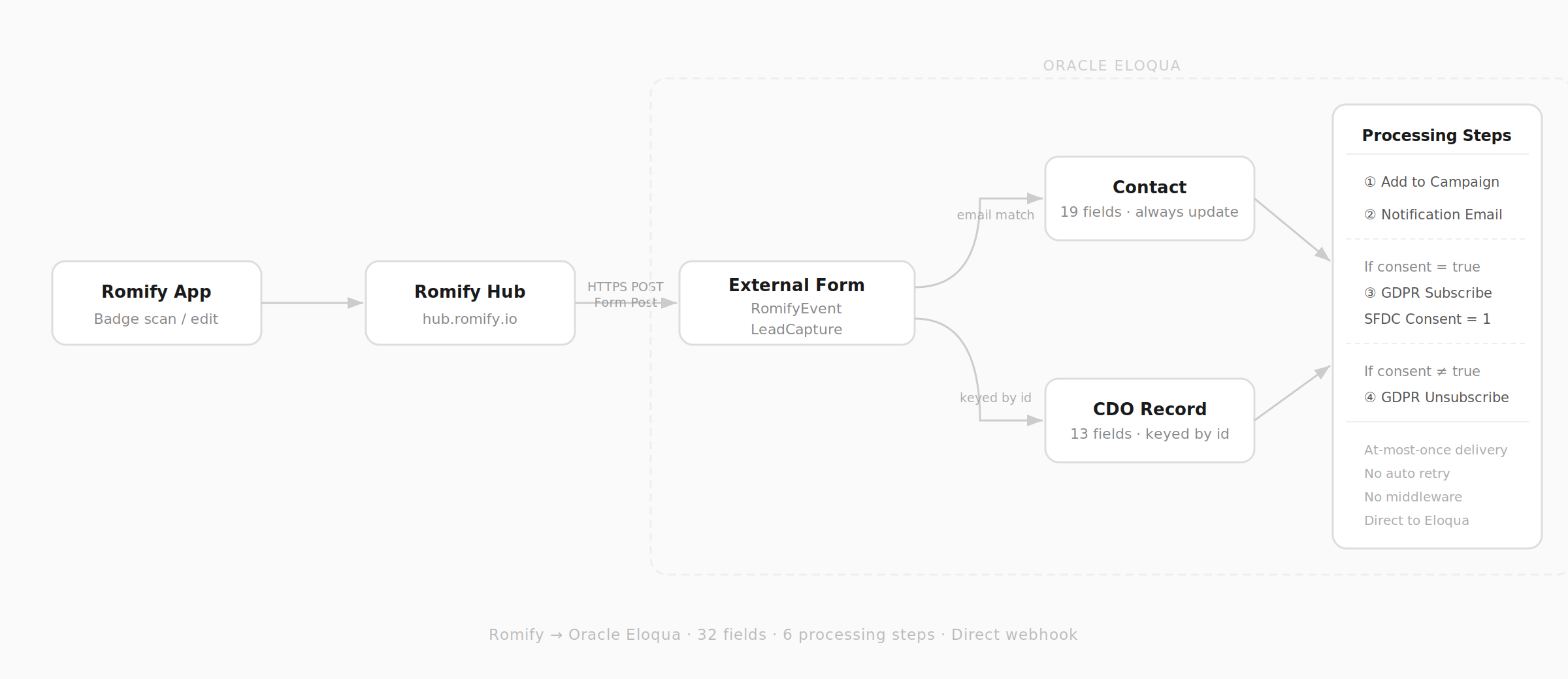
Romify Hub fires a webhook on every lead scan or manual edit. The webhook posts all lead data as a standard HTTP form submission: application/x-www-form-urlencoded, with Payload Mode set to Form Post. There is no middleware, no queue, and no transformation layer between Romify and Eloqua.
Eloqua receives the submission, identifies the contact by email address, and then runs six processing steps in sequence. The value of this build is not a complex integration layer. It is a clean receiving form, exact field names, and predictable Eloqua processing.
The External Form is named RomifyEventLeadCapture. It defines all 32 form fields by their exact HTML names as Romify posts them. The Eloqua domain allowlist is set to hub.romify.io, so any submission from any other domain is rejected at the door. The form action URL includes elqFormName and elqSiteId as query parameters, and that full URL is what goes into the Romify Hub webhook configuration.
Contacts are people. CDO records are moments
Contact identification uses email address as the unique match key. That gives you one Contact record per person, regardless of how many events they attend. All 19 Contact fields are set to Always Update: name, company, job title, phone, address, five qualification fields, and Marketing Consent. Every scan writes the latest captured values.
A Custom Data Object called Romify Event Lead Capture stores one record per scan, keyed by Romify's id field in update-or-insert mode. The CDO links back to the Contact by email address. Its 13 fields cover the event metadata: event name, event ID, start and end dates, action performed, qualification notes summary, captured-by email, Eloqua Campaign ID, and SFDC Campaign ID.
The CDO is where the full picture lives. A contact who attends five events will have one Contact record in Eloqua, updated each time, and five CDO records, each timestamped and attributed to a different event and campaign. This is the right model for event lead capture: contacts are people, CDO records are moments.
Campaign attribution is configured before the scan
Each event in Romify Hub is configured with two default values before the first scan: eloqua_campaign_id and sfdc_campaign_id. Romify posts these automatically as form parameters on every lead from that event.
Both values land in the CDO. eloqua_campaign_id also drives the Add to Campaign processing step, automatically enrolling the contact in the right Eloqua Campaign. Nobody on the event team has to tag leads by hand or remember which campaign ID belongs to which stand, city or show.
Six processing steps run after every submission
The External Form runs six steps in sequence after every successful submission. They are deliberately boring, visible and supportable:
- Update Contacts with Form Data - writes all 19 Contact fields, all Always Update.
- Update Custom Object - writes all 13 CDO fields, keyed on id, update-or-insert.
- Add to Campaign - enrols the contact in the Eloqua Campaign for this event.
- Send Notification Email - sends an immediate alert to the sales team with key lead fields.
- GDPR Subscribe - conditional: if Marketing Consent equals true, sets SFDC Consent to 1 and enrols the contact in the GDPR Subscribe programme at step 100d.
- GDPR Unsubscribe - conditional: if Marketing Consent is not true, enrols the contact in the GDPR Unsubscribe programme at step 100g.
Steps 5 and 6 are mutually exclusive. Every submission where a Marketing Consent value is present routes to one or the other.
The build started with a documentation gap
With the finished architecture clear, here is the honest account of how it got there. The Romify to Eloqua integration is documented. Romify publish a guide covering the webhook to External Form pattern, field mapping, and processing steps. It is a good starting point.
What it does not tell you, at least not with the specificity you need to actually build it, is what your qualifying question fields are called in the webhook payload.
Romify qualification questions are configured per account. Their webhook field names include a short random identifier tied to each question. The documentation describes the pattern as qualifyingquestions_<identifier>_value, but gives you no way to know your identifiers without seeing a live payload. Support was not a route that moved quickly. The documentation described the shape, not the content.
A live payload gave me the real names
The only reliable way to see the real field names was to generate a real payload. That meant downloading the Romify mobile app, getting permissions to access a live event in Romify Hub, manually adding a test lead, answering all the qualification questions, and pointing the Romify webhook temporarily at webhook.site instead of Eloqua.
webhook.site is a free tool that gives you a unique URL and shows every request in real time: headers, body, the lot. A single test scan produced the complete payload. Every field name, including all the qualifying question identifiers, was immediately visible.
- qualifyingquestions_industry_vde_label
- qualifyingquestions_business_unit_mvx_value
- qualifyingquestions_product_of_interest_kid_label
- qualifyingquestions_hot_lead_cht_value
- qualifyingquestions_active_opportunity_on_sfdc_ntv
- qualifyingquestions_marketing_consent_ybf_value
Those suffixes, vde, mvx, kid, cht, ntv and ybf, are account-specific question identifiers. They will be different in every Romify account. The only way to know yours is to capture a live payload.
The payload mode needed correcting
The payload inspection also surfaced something else. The Romify documentation at the time described JSON as the setting to use for the flat JSON schema. In practice, the correct Payload Mode setting is Form Post, not JSON.
Form Post is what sends application/x-www-form-urlencoded parameters, which is what Eloqua External Forms expect. Setting this to JSON causes silent failures with no error surfaced in either system. A direct webhook pointed at webhook.site made this immediately obvious before a single submission reached Eloqua.
From payload to production
With the field names confirmed and the payload mode corrected, the Eloqua build was methodical. Every field name was entered exactly as it appeared in the raw payload: case-sensitive, character-perfect. The External Form field definitions, processing step mappings, and CDO field names all had to match.
The most common failure mode in this kind of integration is a silent field mismatch: the form receives the data, but the field name does not match, so the value lands nowhere with no error thrown.
The GDPR consent steps were configured last, once it was confirmed that qualifyingquestions_marketing_consent_ybf_value was in the payload and that the Eloqua GDPR Subscribe and Unsubscribe programmes were active and correctly configured.
From badge scan to Eloqua contact with full qualification data, campaign attribution, and GDPR consent handling takes seconds. No exports, no uploads, no manual work from the event team after the scan.
Adding a new event is a five-minute task in Romify Hub: set the two campaign ID default values, confirm the Eloqua Campaign is correct, done.
The approach of pointing the webhook at webhook.site first is now the documented starting point for any Romify integration where the qualifying question field names are unknown. It is faster and more reliable than waiting for vendor support, and it tells you exactly what the system is actually sending rather than what the documentation says it should send.
The field names were always there
Good integration work is often less about elegant architecture and more about being willing to do the direct thing. The field names were in every payload the whole time. They just needed someone to capture one.